Mneme
Mneme is an optional knowledge base inside Persephone. Point it at folders of Markdown notes and it indexes them for full-text and meaning-based search. You browse and edit the notes in Persephone, and your AI agent reads, searches and maintains the same notes over MCP. Your files on disk stay the source of truth; the index is derived and can be rebuilt at any time.
Get started
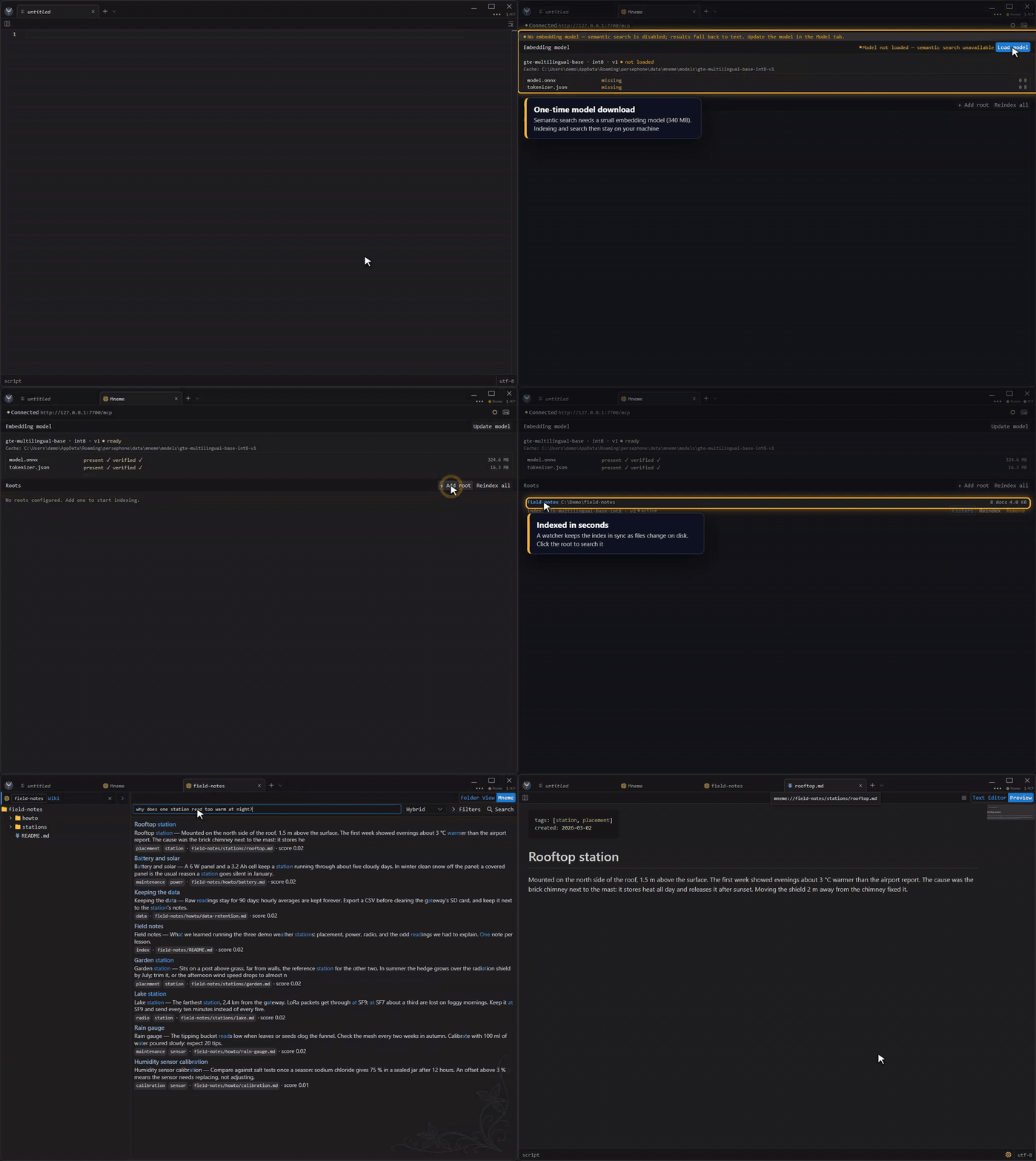
Section titled “Get started”- Turn it on. Open quick settings (the ••• button at the top right) and switch Mneme on. It is off by default, and nothing runs or indexes until you turn it on. The same switch is in Settings, under Mneme.
- Download the model. The Mneme page opens and asks for the embedding model. Click Load model. It is a one-time download of about 340 MB; until then, search works as full-text only.
- Add a folder. Click + Add root, pick a folder of Markdown files and give it a short name. Mneme indexes it in the background and keeps the index in sync as files change.
- Search. Click the root to open it. Type a question in your own words and press Enter.
What you get
Section titled “What you get”- Search by meaning. Hybrid search (the default) matches exact words and meaning, so a note is found even when it uses different words. Text and Vector modes are there too, with tag and date filters.
- A wiki tree. The sidebar shows the root as a tree: open, create, rename and delete notes and folders, drop files in from Windows Explorer, or drag notes between roots.
- Links that work. Notes are addressed as
mneme://{root}/{path}, and links between them open in Persephone. Right-click a note and choose Copy Path to link to it from anywhere. - Memory for your agent. Mneme serves its own MCP endpoint (
http://127.0.0.1:7700/mcp) with file-like tools (read,write,edit,glob,grep) plussearch,tree,timelineandtags. Connect Claude Code, Claude Desktop or any MCP client, and the agent keeps notes and finds them again across sessions.
Private by design
Section titled “Private by design”- Local only. The service runs on your machine and listens on
127.0.0.1. Indexing and search never leave it; the only download is the model. - Your files, your folders. Mneme adds a small
.mnemefolder to each root for its index. Removing a root stops indexing and never deletes your notes.